Applies to: Dynamics 365 Organization 9.0+ with Field Service Solution
With the goal of continuously improving quality, performance, usability, and responding to some customer feedback, we recently released the Resource Scheduling Optimization v2.6 update. Below are the new features and capabilities introduced in this release.
Compliance
- General Data Protection Regulation (GDPR) – Investments address the European privacy law’s requirements. Go to the Trust Center to learn more and find resources to help you comply
- Accessibility enhancements – Go to the Trust Center to learn about our industry-leading accessibility standards.
Enforce skill level
Resource requirements can include not only a skill, but also the level (or rating) of the skill required to do the work. By considering the skill (or resource characteristic) rating level required, the solution is able to find resources that better match required skills and proficiency.
Leverage out-of-box controls
- Replace custom Optimization Scheduling Filter control with out-of-box multi-select control, this enabled accessibility

- Replace custom Constraints control with out-of-box multi-select control which provides full accessibility support
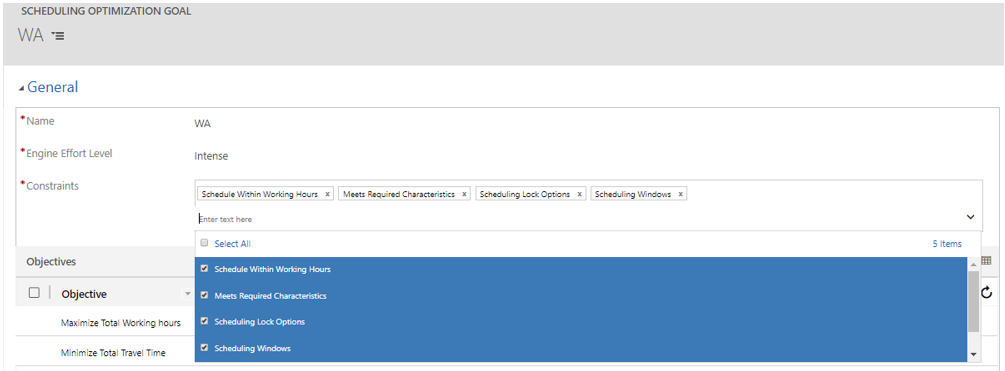
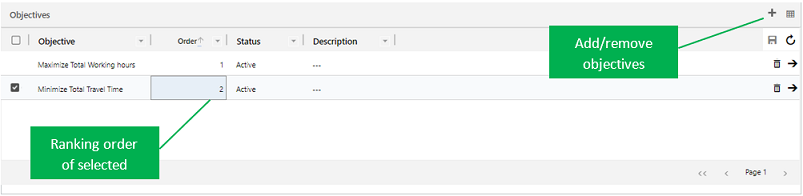
- Replace custom Objectives control with out-of-box editable grid
Default Goal for Optimization Schedule out-of-box controls
- User can setup default goal for optimization schedules, default goal will automatically be populated when open schedule related schedule board

Continuous refactoring and performance improvements
For more information:
- What’s New for Dynamics 365 Resource Scheduling Optimization v2.5 Release
- Release Notes for Resource Scheduling Optimization (v2.0) – Dynamics 365
- What’s New for Dynamics 365 Resource Scheduling Optimization v1.5 Release
- What’s new in the July 2017 update for Field Service and Project Service Automation
- Use Resource Scheduling Optimization to schedule multiple booking requirements on a recurring basis
- Scheduling anything in Dynamics 365 with Universal Resource Scheduling
- What’s new in Dynamics 365 for Field Service and Project Service Automation
- Dynamics 365 for Field Service – User’s Guide
Feifei Qiu
Program Manager
Dynamics 365, Field Project Service Team