Paul Andrew is the technical product manager for Identity Management on the Office 365 team
You can now select an alternate login ID for Office 365 no matter which of the three available identity models you use to create your user accounts. The three identity models are:
- Cloud identity. Users are created in Office 365 and there is no on-premises integration.
- Synchronized identity. Users and passwords exist in on-premises Active Directory and are sync’d to the cloud.
- Federated identity. This is the same as synchronized identity, but password validation is done on-premises with Active Directory Federation Services.
Previously, if you used the synchronized or federated identity model, you were required to use the User Principal Name (UPN) attribute in your on-premises Active Directory as the user sign-in name for Office 365. This caused issues if the UPN was already populated with something incompatible, such as an internal non-routable DNS suffix, or if it had duplicate entries.
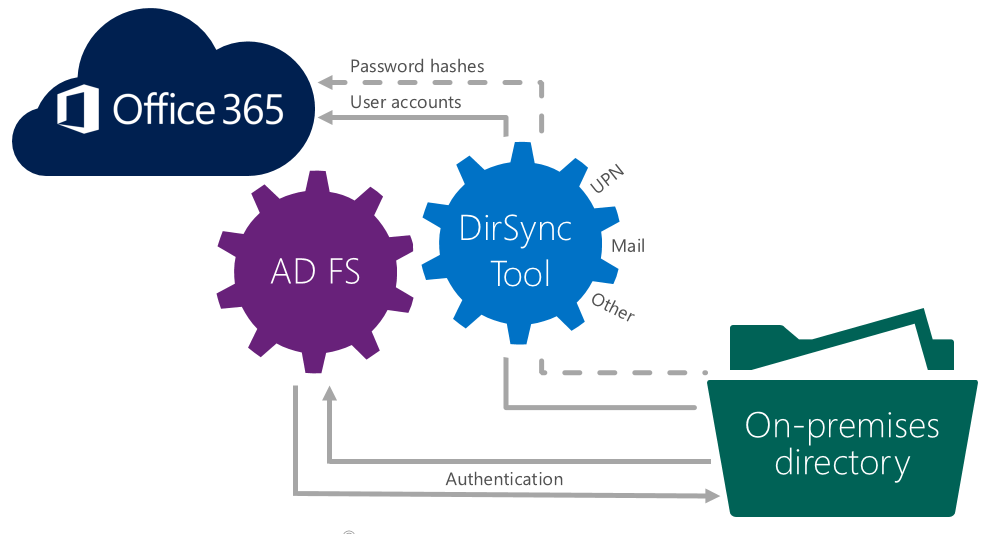
Required reliance on UPN has been removed for the synchronized identity and federated identity models, and you can now select an alternate login ID for use with Office 365 and Azure Active Directory if you use either of these models to create your user accounts. The use of UPN is still the default for these two models. If you want your users to be able to use an alternate login ID, you have to configure your system. When you configure, you can select the Mail attribute or any other attribute in your on-premises Active Directory.
Both the synchronized identity and federated identity models require configuration in Azure Active Directory, and the federated identity model requires additional configuration in Active Directory Federation Services.
For configuration guidance on Alternate ID and some specific support considerations please review Configuring Alternate login ID on TechNet.
The option to create an alternate login ID for Office 365 users when you use the synchronized or federated identity model when you create your user accounts gives you even more choices for configuring your system the way that works best for your organization.
—Paul Andrew