The emails notification will not be send if email template will not be set up on the workflow configuration:
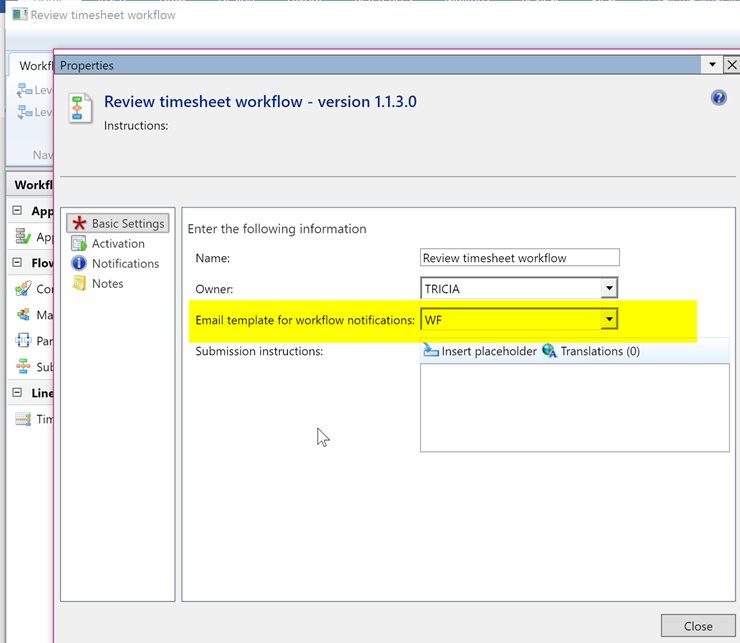
Depend on if the workflow is global or company related there are different ways you need to set it up:
- For the company related workflow you need to set it up in: Organization administration > Setup > Email templates
- For the global workflow you need to set it up in: System administration > Setup > Email > Email messages
How to set up email you can find here (the doc is AX2012 related but it is valid for Dynamics 365 for Operation): https://technet.microsoft.com/en-us/library/aa834423.aspx
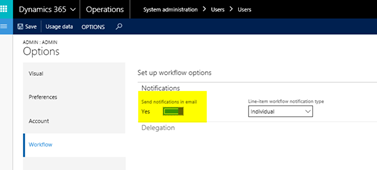
The other think you need to check in the user options you need to make sure that Send notification in email is set to Yes:
To set up email parameters pleaase follow: https://ax.help.dynamics.com/en/wiki/configure-email/
![Avatar of Czesława Langowska Vliegen [MSFT]](https://secure.gravatar.com/avatar/7933315d96be0b8de9c21764d3853a3da614f642723b461e62e61a4e0d4307df?s=212&d=mm&r=g)