Skip to main content Pricing for individuals For families For single users For premium users For students Learn more Pricing for business For small business For schools For government Pricing for enterprise For enterprise For frontline workers For nonprofits For government Meet Copilot Copilot Chat AI Agents Daily Prompt Guide Plans and pricing Microsoft Teams Word Excel PowerPoint Outlook OneDrive SharePoint Planner See all apps and services Microsoft Office Windows 365 Microsoft Viva Microsoft Edge Microsoft Agent 365 Plans and pricing Learn to use Copilot Copilot learning center Cost savings Accounts and billing FAQ Setup and install Templates Training What's new Microsoft Frontier Program Microsoft 365 Roadmap Microsoft 365 Blog Small Business Resource Center Self-help resources Billing support Community Contact Microsoft Support Self-help resources Admin self-help Support plans Find a partner Contact Sales Community Self-help resources Educator Center Request support Contact Microsoft Support Community Become a partner Partner resources See all support Try for free

Try Microsoft 365 Copilot

Available on desktop and mobile devices

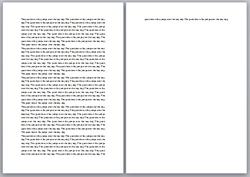
Text is one line too longIf your document is just a little bit longer than one page, how can you shrink it to fit?

We’ve seen customer questions asking where this feature is in Word 2010.

Answer: It’s in the command well. And you can pluck it from there and add it to the ribbon.

In an earlier post on customizing the ribbon, I showed you how to create custom tabs and groups. I created a custom tab called Writing and added a Print group to it. Now, I can add the Shrink One Page command to my Printing group.

To start, click  the File tab, click Options, and click Customize Ribbon.

In the Choose commands from list, click All Commands.
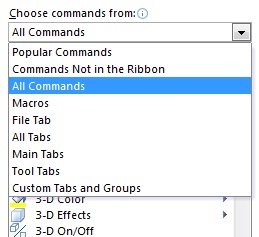
All Commands

Scroll through that long list until you reach Shrink One Page, and then click it.
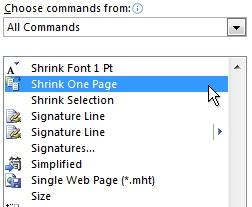
Shrink One Page command

Under Customize the ribbon, click the custom group where you want to add the command. In my case, I’ll click the plus sign next to my custom Writing tab and then I’ll click my custom Printing group.
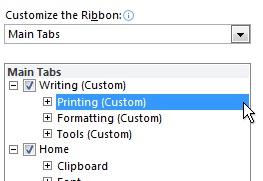
Custom group on a custom tab

Click Add, and then click OK.

Now, the Shrink One Page command is on the ribbon.
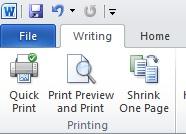
Shrink One Page command on the ribbon

— Joannie Stangeland