The new Visio will have three editions: Microsoft Visio Standard 2013, Microsoft Visio Professional 2013 and Microsoft Visio Pro for Office 365.
Which Visio edition is right for you?
Many of the improvements and new features in the new Visio are available across all editions, but Visio Professional and Visio Pro for Office 365 contain some additional functionality when compared to Visio Standard.
Microsoft Visio Standard 2013 is designed for people looking for a powerful diagraming platform with a rich set of built-in stencils. It helps simplify complex information through simple and easy-to-understand diagrams. Visio Standard includes stencils for business diagrams, organization charts, basic flowcharts and general multi-purpose diagrams.
Microsoft Visio Professional 2013 makes it easier than ever for individuals and teams to create and share professional, versatile diagrams that simplify complex information. It includes all of the functionality of Visio Standard 2013 as well as updated shapes and templates; enhanced support for team collaboration, including the ability for several people to work on a single diagram at the same time; and the ability to link diagrams to data. Visio Professional 2013 includes all of the rich stencils in Visio Standard 2013, and adds additional stencils for business and engineering diagrams, process diagrams (including BPMN 2.0), maps and floor plans, network diagrams, and software and database diagrams.
Microsoft Visio Pro for Office 365, available as a subscription through Microsoft Office 365, includes the same features, stencils and shapes as in Visio Professional 2013. In addition, it allows each user to install Visio on up to five PCs running Windows 7 or Windows 8. It also adds Visio on Demand, which lets users temporarily install Visio on kiosk computers, and it automatically installs the latest feature and security updates for the duration of the subscription.
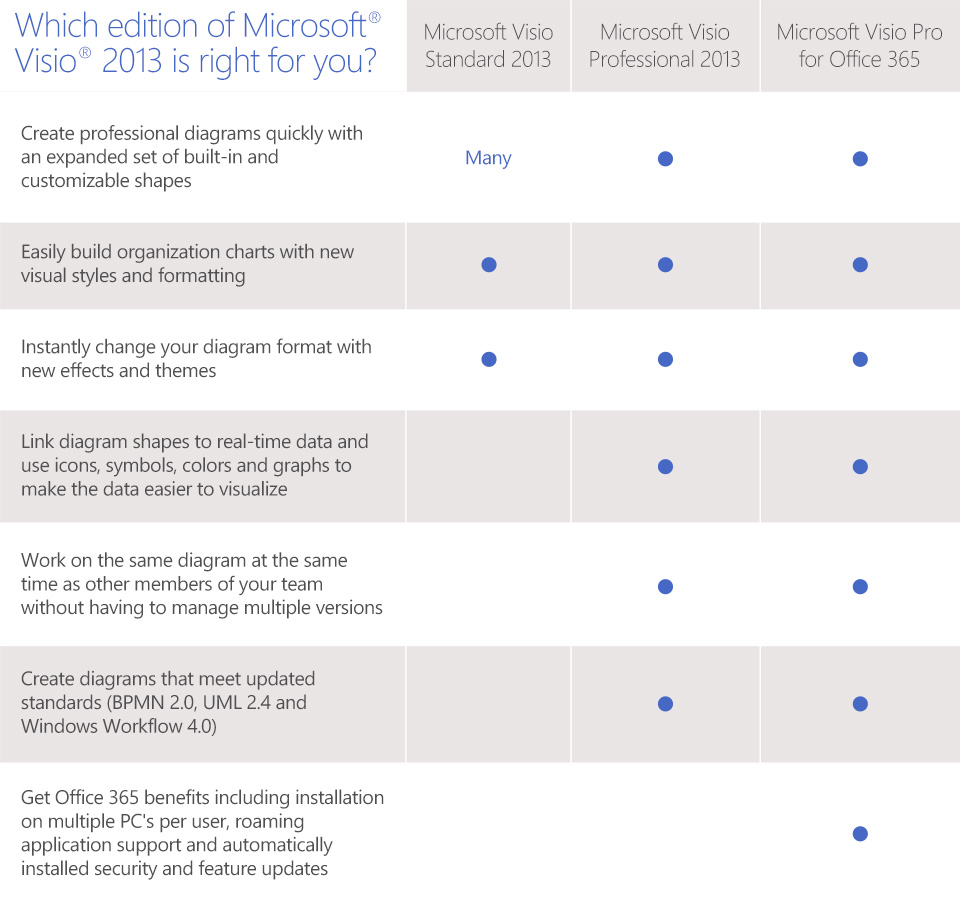
The main functionality differences between the three editions are summarized in the table below. As always, if you have any questions about the differences between the new Visio editions, please let us know in the comments below.
–Ian Mikutel, Program Manager, Visio Team