We’re excited to announce that Enhanced Data Model (EDM) and Bootstrap 5 are now available for four key Dynamics 365 portal templates in Power Pages:
- Customer Self‑Service Portal
- Partner Portal
- Employee Self‑Service Portal
- Community Portal
When you provision a new site using any of these templates, it’s automatically built on the Enhanced Data Model with Bootstrap 5. No additional configuration is needed.
What’s new
- Enhanced Data Model (EDM) for key D365 templates is now generally available. New sites created with any of the four supported templates are automatically provisioned on the EDM, giving you the same modern architecture that Power Pages starter templates already use.
- Bootstrap 5 out of the box – All four templates have been migrated from Bootstrap 3 to Bootstrap 5, delivering improved responsiveness, accessibility, and alignment with current Power Pages UI standards.
- Full Design Studio and Management App support – The Power Pages Design Studio and Power Pages Management app fully support the new EDM‑based templates, including all updated attributes, relationships, forms, and views. Your authoring and customization experience remains seamless.
Why this matters
- Faster provisioning – Sites on EDM provision significantly faster, reducing the time from template selection to a live development environment.
- Streamlined ALM – Website configurations are solution-aware and stored in Dataverse solutions, with support for Environment Variables and Power Pipelines for deployments – making it easier to transport customizations across environments using standard application lifecycle management processes.
- Faster platform updates – Enhancements and bug fixes are delivered more efficiently on the Enhanced Data Model. Customers are not required to actively manage Power Pages solutions to stay up to date, feature updates and security patches are automatically shipped to ensure ongoing security and compliance.
- Modern, accessible UI – Bootstrap 5 brings a responsive grid system, improved accessibility defaults, and a cleaner component library, helping you deliver a polished experience to customers, employees, and partners without additional front‑end work.
With these four templates now on EDM, Dynamics 365 portals benefit from the same platform‑level investments and future enhancements as all other Power Pages sites.
Important: This update applies to newly provisioned sites only. Existing sites on the standard data model continue to operate without impact. Migration tooling for these four Dynamics 365 templates is not yet available but is coming soon.
How to get started
Prerequisites
- Sign in to the Power Platform admin center.
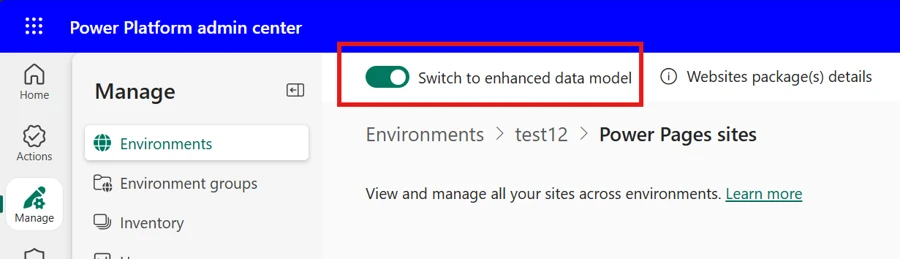
- Go to Manage > Environments > Select your Environment > Resources > Power Pages sites and ensure the Switch to enhanced data model toggle is turned on for your environment.
- Verify your environment has Power Pages Core Package v1.1.2602.230 or later. For upgrade steps, see Update the Power Pages solution.
Create a new site
- Open the Power Pages home page.
- Select Create a site.
- Choose one of the four supported Dynamics 365 templates and select ‘Choose this template’.
- Fill in the required details and select ‘Done’.
- Your new site is provisioned on EDM with Bootstrap 5 automatically.
Learn more
- Enhanced Data Model overview – https://learn.microsoft.com/en-us/power-pages/admin/enhanced-data-model
- Power Pages Management app – https://learn.microsoft.com/en-us/power-pages/configure/portal-management-app
We’d love to hear your feedback! Share your thoughts on the Power Pages community forum.