
When you’re busy at work, the last thing you want to do is spend hours getting a new device set up. In an ideal world, this process takes one, maybe two clicks—and then you’re off to the races.
To make this ideal a reality, our team in Microsoft Digital—the company’s IT organization—created an agentic AI assistant that we’re now using to connect new devices to our network. We built the agent into GetConnected, the internal portal that 18,000 of our employees, vendors, and network administrators use each month to register their new devices to our network when they turn them on for the first time.
Our new workflow is simple, fast, and intuitive—and it’s a significant step up from our previous experience.
Creating the GetConnected AI assistant is part of the role we play as the company’s Customer Zero, where we test and use our technology and platforms first and then share our lessons learned with customers. In this case, we’re sharing how we used the Microsoft Agent Framework (MAF) to enhance onsite device management for our employees. GetConnected does not apply to remote device registrations.

“We’ve been looking across our set of services and capabilities to find places where we can do some experimentation leveraging AI. We wanted to be able to test our hypothesis around those AI investments and then be able to double down if it proved correct.”
Jason Thompson, principal PM manager, Microsoft Digital
Improving a highly trafficked internal tool using AI
Our employees use GetConnected to ensure their wired and wireless devices are registered on the network, as well as to extend device expiration dates and check on the status of their devices.
Heavy employee traffic and the repetitive actions users tend to take on GetConnected led us to realize that the tool was the perfect candidate for an agentic transformation. Our goal was to turn what was a five- or six-step process into something that could be completed in just one or two actions.
“We’ve been looking across our set of services and capabilities to find places where we can do some experimentation leveraging AI,” says Jason Thompson, a principal PM manager in Microsoft Digital. “We wanted to be able to test our hypothesis around those AI investments and then be able to double down if it proved correct.”
The team decided to start small, focusing on a couple of the most popular and crucial functionalities within GetConnected.

“We’d seen previous projects that were very ambitious fail because they tried to achieve too much at one time. Based on customer feedback, we noticed that registration is the simplest, most common action that users were having trouble with. So we said, ‘Let’s do that first.’”
Aayush Dave, product manager, Microsoft Digital
It was also important to listen to our employees—our Customer Zero frontline users. They told us which actions in the experience mattered most to them.
“We’d seen previous projects that were very ambitious fail because they tried to achieve too much at one time,” says Aayush Dave, a product manager in Microsoft Digital. “Based on customer feedback, we noticed that registration is the simplest, most common action that users were having trouble with. So we said, ‘Let’s do that first.’”
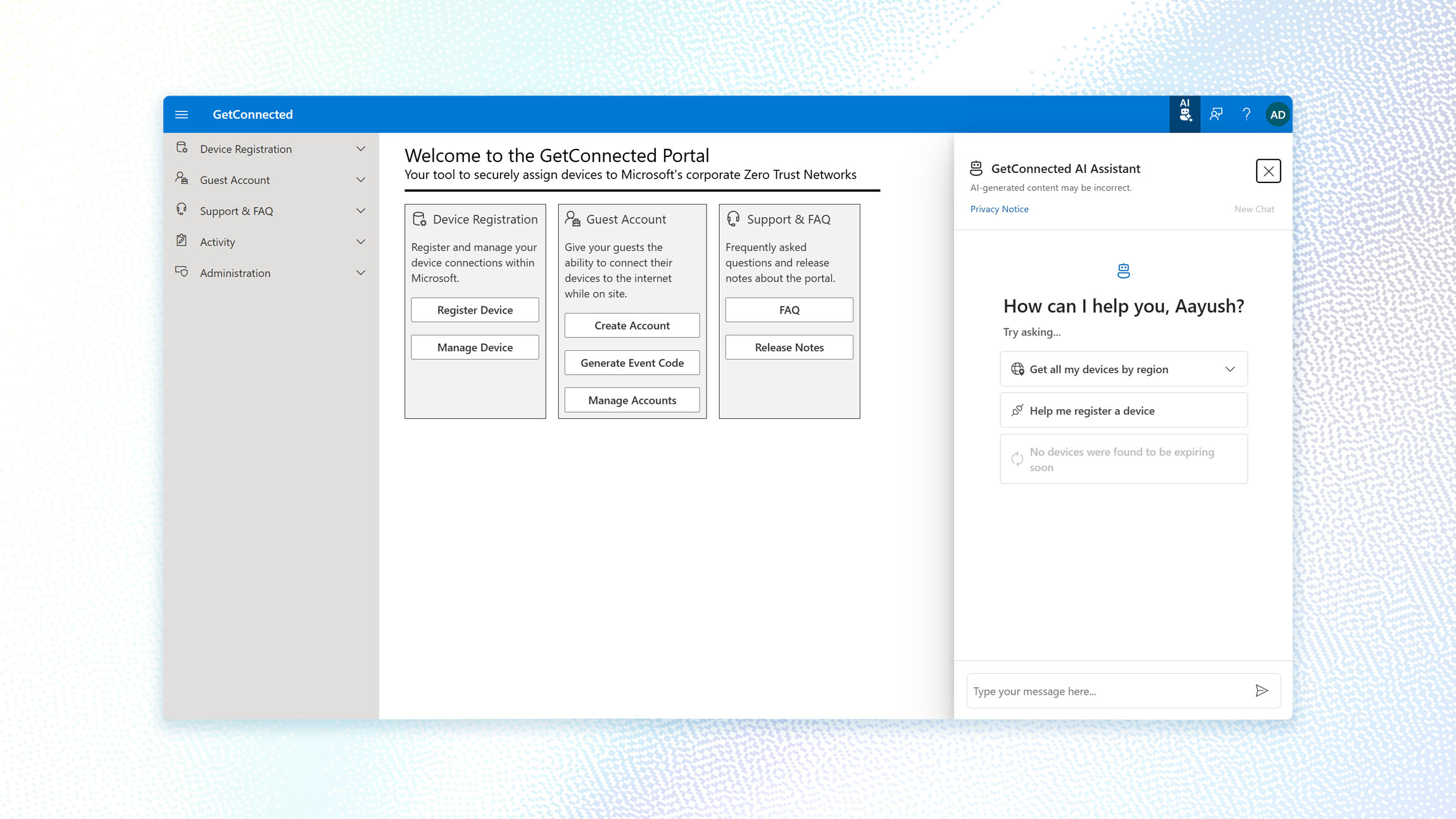
Next up was deciding how the agent would appear in the portal. The Microsoft 365 Copilot model of a sidebar chat menu worked well for other workflows, so it seemed appropriate to approach the new GetConnected experience in a similar way. This enabled us to create a new experience alongside the existing workflow, so customers could still access the original process (should they need to) and compare the two experiences.
“Other teams might decide to automatically replace the UI with an agent,” says Faris Mango, a principal software engineering manager in Microsoft Digital. “But that’s hard, because now you’re forcing people to use the agent. If it’s not ready to be used at full capacity, they don’t have an alternative to accomplish what they intended. We wanted to avoid that situation.”
Testing out Microsoft Agent Framework (MAF)
To build the agent, we considered two paths.
The first was to directly call the Model Context Protocol using JavaScript, an option that would require significant amounts of coding on our part.

“Some declarative agent systems do all of the things in the background, and you don’t get to turn all the little knobs. MAF gives you the flexibility to make the experience exactly what you want.”
Darron Sullivan, principal software engineer, Microsoft Digital
The second was to use Microsoft Agent Framework (MAF), which proved to be simpler and more customizable for our needs.
“Some declarative agent systems do all of the things in the background, and you don’t get to turn all the little knobs,” says Darron Sullivan, a principal software engineer in Microsoft Digital. “MAF gives you the flexibility to make the experience exactly what you want.”
The tricky part, however, was that MAF was fairly new at the time. In fact, the week that the team started developing the GetConnected agent was the same week that MAF was released in preview internally. As we were building out our agent, the framework was going through its own updates, which threatened to hinder our progress. Even one small change to the framework could break our tool’s entire functionality.
“They were moving really fast, and we were adopting new features and finding new bugs all the time,” Sullivan says. “You had to go through that rapid iteration and development, which is a challenge, but it was also pretty awesome because we’re working on the cutting edge.”
The upside was that we were able to provide valuable feedback to the MAF engineers, which in turn could supercharge the work we were doing on our agent. As a bonus, our partnership drove other teams to pursue similar projects.
“The knowledge sharing across our org was notable and crucial,” Dave says. “Our team was one of the first to start building a solution like this, and we presented in numerous architecture forums to share the components and frameworks we were using, and the teams we were working with. This brought the tide up for all boats in our organization, encouraging other teams to start kicking off similar projects as well.”
Building a seamless, discoverable interface
The agent currently has several key functions, the most prominent of which is to register a device on your behalf.
Previously, employees would have to fill in a long, complicated form that asked for a lot of technical details that they often didn’t know offhand, like type of device or the preferred network.
Instead of just selecting options and approving, the flow is more conversational. The user can start with a suggested prompt like “Help me register a device,” and the agent will ask for the required information (with examples for each field). If the user isn’t sure about something (for example, how to find a MAC address), they can ask follow-up questions, and the agent will pull in FAQ and help content to guide them.
Once all the required details are collected, the agent can complete the registration on the user’s behalf after the user approves it.
Once it has your approval, the chatbot submits the request and replies whether or not it was successful. Users can also ask the agent to show devices that are expired or will soon expire, then prompt the agent to renew those devices if desired.

Seamlessly integrating the agent into GetConnected required upgrading the existing user interface using Fluent.
These updates were needed to support the AI interface integration. Specifically, we introduced a custom header action to launch the AI side panel. Prior to upgrading, doing this would have required using Coherence components outside of their intended patterns.

“We used Fluent AI components to build the AI interface. This helped ensure a consistent Microsoft look and feel across the experience, built-in accessibility for scenarios like screen readers and mobile usage, and components that are designed for conversational and agent-driven interactions.”
Nathan Chambers, software engineer, Microsoft Digital
To stay consistent with the existing app architecture, we upgraded core dependencies like Fluent UI and Coherence to their latest versions. As part of upgrading Coherence across several major versions, it also required us to move the feedback experience to Centro to align with the updated patterns. We then needed to update other parts of the experience like navigation, FAQ, and release notes to match those newer component patterns.
“We used Fluent AI components to build the AI interface,” says Nathan Chambers, a software engineer in Microsoft Digital. “This helped ensure a consistent Microsoft look and feel across the experience, built-in accessibility for scenarios like screen readers and mobile usage, and components that are designed for conversational and agent-driven interactions.”
While making these upgrades, we ran tests to ensure the experience was accessible—for example, for screen reader users or others who might access GetConnected on their phones.

“You can have an amazing, strong piece of software that is well built and focuses on security. But if you don’t have the traffic or people are not using it, it’s worthless.”
Faris Mango, principal software engineering manager, Microsoft Digital
Next, we wanted the agent to be as discoverable as possible. Without people actually navigating to it, there would be no way to show proof of concept. So, we built it so the agent automatically popped open via a side panel when someone loaded GetConnected.
“You can have an amazing, strong piece of software that is well built and focuses on security,” Mango says. “But if you don’t have the traffic or people are not using it, it’s worthless.”
We also wanted to gather early feedback from users. Before releasing it to the entire company, we had internal team members and frequent GetConnected users give the agent a try. Almost immediately, it was clear we had too many approval notices.
“At the beginning, we would have approvals for every single action. For example, if you wanted to see a device in different regions like Puget Sound, Latin America, or Canada, you had to do a separate approval for each region,” Dave says. “This was a very painful experience. So we removed all the approvals and pared it down to a one-click experience.”
Users also had issues with the approval language, which they said was hard to understand and looked like an error message. The next iteration took out much of the technical jargon, making the message more conversational and easier to read.
An agent experience driven by feedback
Our work as Customer Zero is never done. For GetConnected, we’re eager to keep collecting feedback. One major goal is to improve the agent’s performance, making it faster and more responsive.
Our feedback survey is tied directly to a performance dashboard, which tracks metrics like new and returning users, total unique users, conversions, and interactions. Each user submission generates a work item.
“When users leave feedback about something they don’t like, I feed that to the team, and then we sit down and figure out how we can improve that specific part of the experience,” Dave says.
With each update, we’re seeing the payoff of more users and more interactions. The traditional method of registering a device is also seeing a drop-off as more people lean on the agent for assistance.
“Before, you used to have to go into the system and change something about the experience manually. Now, our engineers are going to an AI model and telling it, ‘Hey, you’re doing this part wrong, please improve it.’”
Aayush Dave, product manager, Microsoft Digital
Looking ahead to more use cases
Building an agent has allowed the team to embrace an entirely new type of engineering.
“Before, you used to have to go into the system and change something about the experience manually,” Dave says. “Now, our engineers are going to an AI model and telling it, ‘Hey, you’re doing this part wrong, please improve it.’”
It’s also serving as a reminder to seek progress over perfection.
“AI is changing things so quickly,” Thompson says. “It’s better to do rapid prototyping and roll it out, and start getting the data in terms of how successful the experience is. Then you can let that guide you, in terms of how you iterate going forward.”
Because of the success we’ve had with the GetConnected device registration feature, we’re already exploring other capabilities, including bulk operations to accommodate our facilities managers who need to onboard many devices at once. As AI agents become mainstreamed in many workflows across our organization, we anticipate usage and functionality will continue to grow exponentially.
Key takeaways
If you want to create a similar agent to streamline processes or automate workflows in your organization, keep these tips in mind:
- Transition gradually and maintain existing experiences. Until you’re confident users are happy with the new product, continue to give them access to original workflows. This allows them to compare experiences and provide contextual feedback.
- Remove unnecessary steps for simpler processes. The user need to formally approve every step along the way. Cut the cognitive load and focus on getting user signoff where it counts.
- Check existing systems for compatibility. Before diving into design, ensure that your current systems can support your goals, and address any gaps early on to avoid running into limitations later.
- Get feedback early and often. Release a minimum viable product to users to make sure it aligns with how they work, and fix any bugs before expanding its capabilities.
- Maintain a low ego. Take user feedback to heart. Put their needs first, rather than what you think the product should be.
Try it out
Related links
- Check out how to get started with Fluent UI.
- Learn how we’re using AI to proactively address device management issues.
- Dive into agents with our in-depth guide to governance, implementation, and adoption.
- See how we created a self-service agent for employees to get their most burning questions answered.
