
For many years, our process for getting new work PCs to employees at Microsoft remained largely unchanged: Decentralized and variable, with data spread across systems, refresh cycles differing by team and geography, and manual steps required throughout the journey.

“The legacy system was highly fragmented, with more than 50 device options, localized processes, data scattered across different systems, manual touchpoints, and limited visibility into order status. This created a lot of friction across the company, as well as higher costs.”
Aniruddha Das, principal PM manager, Microsoft Digital
But as our organization scaled globally, this system became increasingly complex and inefficient.
Across more than 200,000 employees in over 100 countries and regions, our device procurement and inventory management devolved into a patchwork of systems and practices. There was no top-level management, no consistent lifecycle model, and no standardized experience for employees needing to order a new device.
“The legacy system was highly fragmented, with more than 50 device options, localized processes, data scattered across different systems, manual touchpoints, and limited visibility into order status,” says Aniruddha Das, a principal PM manager in Microsoft Digital, the company’s IT organization. “This created a lot of friction across the company, as well as higher costs.”
Working in partnership with Procurement, we built myDevice—a companywide program that centralizes primary-device procurement and lifecycle workflows within a single managed platform. myDevice brought together previously distributed data and processes, giving us reliable visibility into each employee’s primary device and enabling predictable, data-driven refresh planning at scale—along with the operational insights needed to run the end-to-end experience.

“We’ve moved from a fragmented device procurement experience with many touchpoints to one conversation with one agent. Basically, we can tell our employees that their next device is just a conversation away.”
Mukul Singhal, partner engineering manager, Microsoft Digital
Beyond solving some of these basic data challenges, we also needed to address harder, at‑scale problems in the broader procurement experience: helping employees confidently pick the right device without getting overwhelmed by options, aligning eligibility and catalog choices to an employee’s role and location, and more.
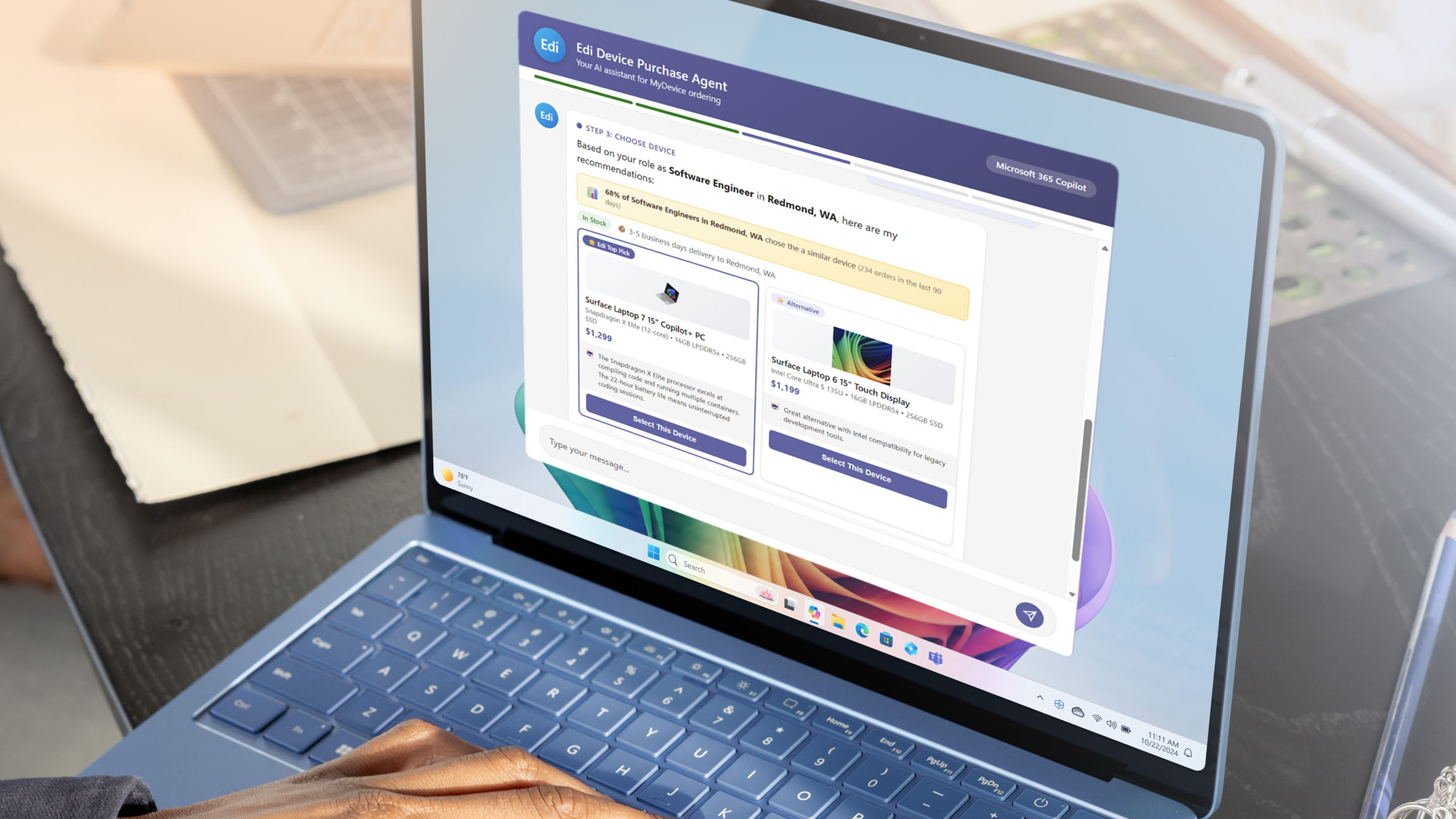
With the new Employee Device Information (EDI) agent—affectionately referred to as “Eddie”—our employees will soon be able to use an AI chat interface to quickly explore recommended device options based on their job role and work needs, compare different models, and order a new device with a single click. This streamlined approach will reduce frustration, save time, and cut our costs as we automate a formerly manual process.
“We’ve moved from a fragmented device procurement experience with many touchpoints to one conversation with one agent,” says Mukul Singhal, a partner engineering manager in Microsoft Digital. “Basically, we can tell our employees that their next device is just a conversation away.”
Creating a unified approach with myDevice
The transformation began about three years ago, when our Procurement partners brought their vision for myDevice to us in Microsoft Digital. The stated goal was to standardize employee device procurement, inventory, and lifecycle management across the company.

“Our decentralized process was an industry outlier, and we realized we needed to pivot toward a standardized global process. We wanted to give our employees a single entry point, with consistent guidance across the enterprise.”
Angela Pearson, senior procurement program manager, Microsoft Procurement
Built on top of our internal ServiceNow platform, myDevice brought together previously disconnected workflows into a single consistent experience for employees. It introduced a common catalog of devices, standardized refresh cycles, and centralized ordering and fulfillment processes.
It was evident that such a system was badly needed.
“Our decentralized process was an industry outlier, and we realized we needed to pivot toward a standardized global process,” says Angela Pearson, a senior procurement program manager in Microsoft Procurement. “We wanted to give our employees a single-entry point, with consistent guidance across the enterprise. That was the first big win.”
Purchasing devices for a global workforce the size of Microsoft is not an insignificant budget item. And our fragmented system meant higher costs for the organization.
“The decentralized procurement model allowed teams to move fast, but it also led to inefficiencies,” Das says. “Devices were often purchased at the end of the fiscal cycle, because there was budget, but they didn’t always match real requirements and would sometimes go unused.”
This list maps out the evolution of our device procurement program here at Microsoft:
Legacy state
- Distributed experience: Inconsistent, inefficient processes across countries and business groups
- Zero visibility: Lack of proper asset tracking, accounting, or device management
- High friction and high cost: Significant manual effort required across multiple touchpoints
Foundation: myDevice 1.0
- Unified global experience: One consistent process across all geographies and divisions
- Persona-based: Guided buy for productivity needs based on job role
- Streamlined workflows: Optimized automated processes reducing manual touchpoints
- Enhanced visibility: Improved data management and asset tracking entering the company
Future vision: myDevice 2.0
- Next-gen interface: AI-driven, seamless employee interaction
- Supply chain resiliency: Built to weather disruption
- AI-assisted workflows: Intelligent automation across backend systems and processes
Creating a solution at the scale required for myDevice was a challenge. Relevant data was spread across systems, refresh cycles were inconsistent, and key processes, such as determining which devices should be refreshed, were often manual and time-intensive.
“The data was distributed across multiple systems, and each group was doing their own cycle,” says Amit Raghuwanshi, a principal software engineering manager in Microsoft Digital. “Bringing all the relevant data together was a huge task and big part of the solution.”
Three scenarios for device procurement
Our employees interact with three different workflows that involve obtaining a new primary work device:
- New hire provisioning
- Device refresh (for aging machines)
- Replacement for damaged devices
- 23% reduction in primary work device spend (saving roughly $20 million annually)
- Average cost per device reduced from $1850 to $1670
- 50,000+ employees equipped globally in the last fiscal year
- Reduced from 50-plus device models due to role-based recommendations
- Eliminated end-of-fiscal-year spending spikes through predictable quarterly planning
- Improved sustainability through increased device reuse and recycling
- Unify before you optimize. We discovered that fragmented, decentralized processes don’t scale, and that a standardized platform for procurement, lifecycle management, and device visibility was worth the investment of time and resources to implement.
- Design for simplicity. Moving from multiple touchpoints to a single conversational interface dramatically reduces friction in any organizational process.
- Use AI to guide decisions, not just automate tasks. Employees often struggle with too many choices when it comes to device selection. Embedding persona-based AI recommendations helps users quickly make the right decision.
- Establish and enforce a clear lifecycle model. Standard refresh cycles and automated triggers eliminate guesswork, improve planning, and ensure devices are refreshed based on actual need.
- Pair process change with supply chain strategy. Align your new process with inventory forecasting and sourcing models to reduce fulfillment times and improve first-day readiness for employees.
- Design for an agent-first world. Plan for a future where employees “talk to systems” through AI agents, with predictive insights and seamless execution built in.
- See how we’re simplifying device registration with the help of agentic AI.
- Discover our detailed guide to deploying agents at Microsoft.
- Read about how we’re transforming IT support at Microsoft with the Employee Self-Service Agent.
- Discover how we’re reshaping AI management internally with Agent 365 and Copilot controls.
- Explore our journey with Windows 11 and Copilot+ PCs.
- Check out our playbook for becoming a Frontier Firm in the age of AI.
Each of these core scenarios now follows a standardized process, replacing the ad hoc methods that previously varied by team and geography.

“If a new hire’s device arrives a week after they join the company, that’s not a good experience. We want them to have it on day one.”
Ashok Bagade, principal product manager, Microsoft Digital
Establishing a clear device lifecycle was a big step. For example, Microsoft employees are eligible for a new PC (called a refresh) every four years. Now, with myDevice, roughly 20,000 employees each quarter automatically get a refresh invite, presuming available budget. This takes the burden off IT, admins, and other support staff who were previously tasked with managing this process manually.
The myDevice system is also improving the process for new hire device procurement. The goal has always been for each new Microsoft employee to have a computer waiting for them on their first day, but the gaps in the previous system often made meeting this standard difficult.
“If a new hire’s device arrives a week after they join the company, that’s not a good experience,” says Ashok Bagade, a principal product manager in Microsoft Digital. “We want them to have it on day one. Today, we are only able to do that around 70% of the time. We want to take that rate up to 98%.”
To make that happen, we’re in the process of shifting from a build-to-order device model to an inventory-based model. This means that our suppliers will have a stockpile of our most frequently requested PCs on hand, based on data we have compiled. This approach is designed to reduce the device procurement time from four to six weeks down to less than two weeks, Bagade says.
By centralizing and standardizing device management, myDevice created the foundation for the next phase of transforming this process: intelligence.
Adding AI for a seamless procurement experience
The second part of reimagining our employee device procurement at Microsoft was on the front end, which is the digital interface our people experience when they need to choose their new device.
Even with a unified platform in place, the experience of selecting and ordering the device could be time consuming and disjointed. Employees could browse a list of available computers, but choosing the right one still required research and consultation with colleagues and led to cognitive overwhelm.
“The challenge we saw is that people take a long time to complete their purchase because they don’t know which device to select,” Bagade says. “They get a bunch of options, and they’re not sure which one is right for them.”
So we built EDI (or “Eddie”), an AI-powered agent created with Microsoft Copilot Studio, that makes the process much more efficient. Eddie is transforming a static workflow into a conversational experience.
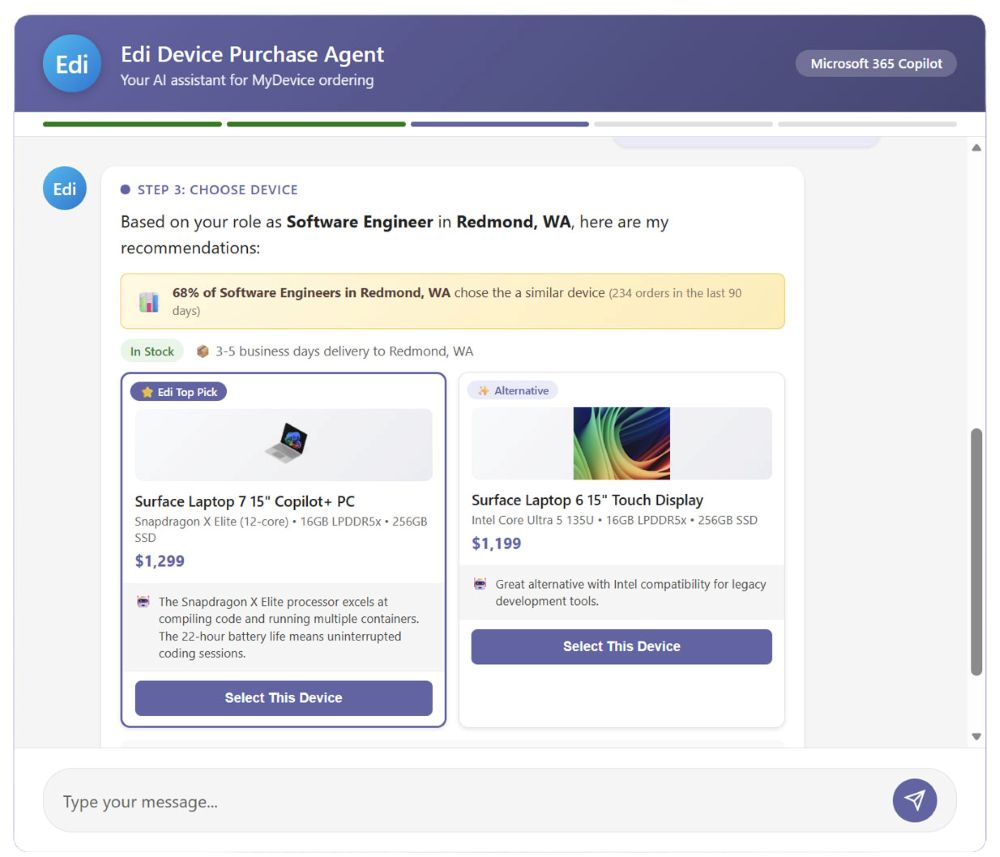
With Eddie, employees get a guided, conversational buying experience instead of a form-led journey. The agent validates the employee’s eligibility, captures the required inputs, and then offers role-aligned device choices directly in the chat—complete with comparison details and a clear selection path. Once confirmed, the employee submits the request and receives a trackable ServiceNow reference, which reduces follow-ups and helps employees stay informed on the process end-to-end.
“Eddie not only gives a consistent purchasing experience—it also guides you,” Bagade says. “You can ask questions and, through that conversation, narrow down your options.”
The agent is underpinned by a multi-agent architecture where specialized components handle different aspects of the process—catalog browsing, comparison, recommendations, and ordering—coordinated by an orchestration layer.
“With Eddie, the agent validates the information and, in many cases, executes the change. It can literally happen in minutes.”
Aniruddha Das, principal product manager, Microsoft Digital
Reducing complexity and increasing visibility
EDI also addresses operational pain points that extend beyond purchasing. One early challenge focused on correcting primary device records, which is an essential but previously manual process.
“Before we developed this solution, something as simple as correcting an employee’s primary device required multiple tickets and human validation,” Das says. “It could take weeks—and in some cases months—to resolve. With Eddie, the agent validates the information and, in many cases, executes the change. It can literally happen in minutes.”
Another critical improvement is visibility. Previously, once a device request was submitted, it effectively disappeared into a system that offered limited transparency.
“After placing a request, employees had no way to check on the status—it went into a black hole,” Das says. “Now, Eddie can look at the same data that Procurement has and provide answers immediately.”
Bottom-line impacts of myDevice and EDI
Looking ahead: From systems to conversations
With myDevice and EDI in place, we’re now focused on the next phase: transforming device management into a fully conversational, intelligent experience. The vision is to move beyond portals entirely and toward an agent-first model where employees interact with systems through natural language.

“Our view for the future is that you won’t need to visit a UI or a system to accomplish a task, you’ll just start talking to an AI agent.”
Amit Raghuwanshi, principal software engineering manager, Microsoft Digital
This includes expanding capabilities such as predictive refresh cycles, deeper personalization, and tighter integration with supply chain and inventory systems. Efforts are also underway to reduce fulfillment times through innovations like centralized inventory management and forecasting.
At the same time, the experience will continue to evolve toward greater simplicity.
“Our view for the future is that you won’t need to visit a UI or a system to accomplish a task, you’ll just start talking to an AI agent,” Raghuwanshi says.
For employees, that shift means less friction, faster decisions, and a more intuitive experience.

“We know how busy our employees are, and we don’t want them spending time on lower-priority tasks. When it’s time to acquire a new device, the experience should be seamless from start to finish, without added complexity or cognitive burden. We’re making steady progress toward that reality.”
Anna Adams, director of hardware programs and operations, Microsoft Procurement
For our organization, it represents a broader transformation—one where AI not only improves existing processes but fundamentally reshapes our workflows and the way that work gets done across all functions.
This means that our employees have one less process that they have to puzzle through and figure out, which allows them to focus on their higher-value work.
“We know how busy our employees are, and we don’t want them spending time on lower-priority tasks,” says Anna Adams, director of hardware programs and operations in Microsoft Procurement. “When it’s time to acquire a new device, the experience should be seamless from start to finish, without added complexity or cognitive burden. We’re making steady progress toward that reality.”
Key takeaways
If you’re planning on revamping how your organization approaches employee device procurement, consider what we learned over the course of our journey:
